
Download Pixelied – Fast, Free‑Trial Graphic Design Tool for Social Media, E‑commerce & Marketing
Overview
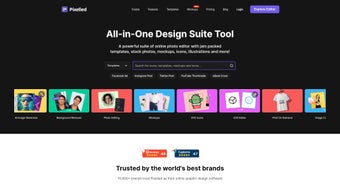
Pixelied is a comprehensive online graphic design tool that brings professional‑grade creativity to anyone with an internet connection. Built as a web‑based suite, Pixelied eliminates the need for bulky desktop applications and offers a clean, intuitive interface that works equally well for marketers, e‑commerce entrepreneurs, and casual social‑media enthusiasts. The platform’s core promise is speed: from the moment you land on the dashboard, you can select a template, drag‑and‑drop elements, and publish a finished visual in a matter of minutes.
Whether you need eye‑catching Facebook ads, Instagram stories, YouTube thumbnails, or product‑listing graphics for Shopify, Pixelied provides a library of pre‑designed assets that can be fully customized to match brand guidelines. One of the standout aspects of Pixelied is its balance between simplicity and depth. While beginners can rely on ready‑made layouts and one‑click filters, power users can dive into detailed image editing—adjusting brightness, contrast, saturation, or applying advanced filters.
The tool also packs an image converter, an SVG editor, and an icon maker, turning a single platform into a mini‑studio for all visual needs. Because it runs in the browser, updates are instantaneous and security is handled on the server side, giving users peace of mind that their data and designs are safe. Pixelied’s subscription model offers a free tier with limited exports and a premium tier that unlocks unlimited downloads, brand kits, and priority support, making it a flexible solution for both small businesses and large agencies.
Key Features That Set Pixelied Apart
- Vast Template Library: Over 10,000 ready‑made templates covering social media, ads, newsletters, presentations, and more.
- Drag‑and‑Drop Editor: Intuitive canvas with snap‑to‑grid, layer management, and real‑time preview.
- Advanced Image Editing: Filters, photo effects, brightness/contrast, hue, saturation, and background remover.
- SVG & Icon Maker: Create scalable vector graphics, edit paths, and export in multiple formats.
- Image Converter: Convert JPG, PNG, GIF, WebP, and SVG with one click, preserving quality.
- Brand Kit: Store brand colors, fonts, and logos for consistent design across all projects.
- Collaboration Tools: Share design links, comment, and co‑edit with team members in real time.
- Export Options: Download in PNG, JPG, PDF, SVG, or directly schedule posts to social platforms.
- Secure Cloud Storage: All projects saved automatically, accessible from any device.
- Regular Updates: New templates, features, and performance improvements rolled out weekly.
Why These Features Matter for Your Workflow
The sheer breadth of Pixelied’s feature set means you rarely need to switch between multiple apps. For a marketer, the brand kit and template library cut down design time dramatically, allowing more focus on strategy. E‑commerce owners benefit from the image converter and SVG editor, ensuring product photos are optimized for speed without sacrificing visual fidelity.
Social‑media managers love the one‑click export directly to platforms, which eliminates the tedious step of downloading files and re‑uploading them manually. Moreover, the collaborative commenting system keeps feedback loops short, turning what used to be an email‑heavy process into a streamlined, in‑app discussion. This combination of speed, flexibility, and depth is precisely why Pixelied is gaining traction among both freelancers and larger agencies.
Installation, Usage Instructions & Compatibility
Getting Started – No Download Required
Since Pixelied is a fully web‑based solution, the “installation” process is essentially creating an account. Visit pixelied.com, click “Sign Up,” and you can choose to register with an email address or through Google/Facebook OAuth. After confirming your email, you’ll land on the dashboard where you can immediately start a new project. The free tier allows up to three projects per month, giving you a risk‑free way to explore the interface before committing to a paid plan.
Step‑by‑Step Workflow
1. Select a Template or Blank Canvas: Use the search bar to find templates by platform (e.g., Instagram post) or by industry (e.g., “real‑estate flyer”).
2. Customize Elements: Click any text box to edit copy, replace images by dragging from your computer, or use the built‑in stock library.
Adjust colors via the brand kit or manually using the color picker.
3. Apply Filters & Effects: Select an image, then choose from filters like “Vintage,” “Neon,” or “Black‑and‑White.” Fine‑tune with sliders for brightness, contrast, and saturation.
4. Export or Publish: When satisfied, click “Export” to download in your preferred format, or click “Schedule” to post directly to Facebook, Instagram, or LinkedIn.
5.
Save & Share: All designs are auto‑saved to the cloud. Use the “Share Link” button to collaborate with teammates or clients.
Compatibility Across Devices
Pixelied runs on any modern web browser, making it compatible with Windows 10/11, macOS Monterey and later, Chrome OS, as well as mobile browsers on Android 8+ and iOS 13+. Because the editor is HTML5‑based, there’s no need for plugins or Java applets, and performance remains smooth even on lower‑end laptops. For users who prefer a dedicated app experience, Pixelied offers progressive web app (PWA) capabilities: you can “install” the site to your desktop or mobile home screen, and it will launch in a window‑less, app‑like mode while still leveraging the cloud backend for updates and storage.
Tips for Maximizing Speed and Security
To ensure the fastest loading times, keep your browser updated and clear cache regularly. Pixelied uses SSL encryption (HTTPS) for all data transfers, and files are stored on secure AWS servers with regular backups. If you’re handling sensitive brand assets, enable two‑factor authentication (2FA) from the account settings page. For teams, assign role‑based permissions (admin, editor, viewer) to control who can edit or publish designs. These built‑in security features make Pixelied a safe environment for both small startups and large enterprises.
Pros and Cons of Pixelied
Pros
- Extensive template library covering dozens of niches.
- Fully browser‑based – no heavy software download required.
- Advanced image editing tools rival desktop alternatives.
- Built‑in SVG editor and icon maker for vector graphics.
- Collaboration features streamline feedback loops.
- Secure cloud storage and regular automatic updates.
- Affordable pricing tiers with a generous free plan.
Cons
- Free tier limits export resolution and number of projects.
- Performance may dip on very large files with slower internet.
- Some niche templates require premium subscription.
- No offline desktop version for users with unreliable connectivity.
Frequently Asked Questions
Is Pixelied really free to use?
Pixelied offers a free tier that allows you to create up to three projects per month with limited export options. For unlimited projects, higher resolution downloads, and premium templates, you’ll need a paid subscription.
Can I use Pixelied on a mobile device?
Yes. Pixelied works on modern mobile browsers for Android and iOS. Additionally, you can install it as a progressive web app (PWA) for a more app‑like experience.
How does Pixelied handle my data security?
All data transfers are encrypted via HTTPS, and files are stored on AWS servers with regular backups. Two‑factor authentication and role‑based permissions add extra layers of protection.
Is there an offline mode?
Pixelied is primarily cloud‑based and requires an internet connection. While the PWA can cache some UI elements, full editing capabilities need online access.
What export formats are supported?
You can export designs as PNG, JPG, PDF, SVG, and WebP. Premium users also have access to high‑resolution options and transparent background exports.
Conclusion – Should You Download Pixelied?
Pixelied delivers a compelling mix of speed, versatility, and affordability that makes it an excellent choice for anyone who needs to produce professional graphics without mastering complex desktop software. Its browser‑first architecture ensures you’re always working with the latest features, while the robust template library and vector tools keep creative possibilities open. Whether you’re a solo entrepreneur looking to design eye‑catching ads, a social‑media manager needing quick turn‑around assets, or a design agency seeking a collaborative cloud platform, Pixelied checks the essential boxes. The free tier provides a low‑risk entry point, and the premium plans are priced competitively compared to traditional Adobe subscriptions.
Ready to boost your visual content workflow? Download Pixelied today, start with the free plan, and see how quickly you can turn ideas into polished designs. For teams, the collaborative features will streamline approvals and keep brand consistency across every channel. Give Pixelied a spin and experience a modern, secure, and fast graphic design solution that grows with your business.
Overall Rating: 4.6/5
Pros: Extensive templates, cloud‑based convenience, powerful vector editor.
Cons: Limited exports on free plan, no true offline mode.



.png)



